Back to integration tutorials
This tutorial helps you understand the basics of how Ballerina can be used to integrate several services and expose them as a single service.
Overview
In this tutorial, you will develop a service that accepts requests to make an appointment at a hospital, makes multiple calls to different backend services to make the appointment, and responds to the client with the relevant details. Calls to the backend services are made one after the other, given that information from one call is required for the next. This effectively integrates several services and exposes them as a single service, also known as service orchestration.
To implement this use case, you will develop a REST service with a single resource using Visual Studio Code with the Ballerina Swan Lake extension, and then run the service. This resource will receive the user request, call the backend services to make the appointment, and respond to the user request with the appointment details.
The flow is as follows.
-
Receive a request with a JSON payload in the following form.
{ "patient": { "name": "John Doe", "dob": "1940-03-19", "ssn": "234-23-525", "address": "California", "phone": "8770586755", "email": "johndoe@gmail.com", "cardNo": "7844481124110331" }, "doctor": "thomas collins", "hospital_id": "grandoaks", "hospital": "grand oak community hospital", "appointment_date": "2023-10-02" } -
Extract necessary details from the request (e.g., hospital, patient, doctor, etc.) and make a call to the hospital backend service to request an appointment. A response similar to the following will be returned from the hospital backend service on success.
{ "appointmentNumber": 1, "doctor": { "name": "thomas collins", "hospital": "grand oak community hospital", "category": "surgery", "availability": "9.00 a.m - 11.00 a.m", "fee": 7000 }, "patient": { "name": "John Doe", "dob": "1940-03-19", "ssn": "234-23-525", "address": "California", "phone": "8770586755", "email": "johndoe@gmail.com" }, "hospital": "grand oak community hospital", "confirmed": false, "appointmentDate": "2023-10-02" } -
Use the hospital ID and the appointment number and call the hospital backend service to retrieve the fee for the appointment. The response will be similar to the following.
{ "patientName": "John Doe", "doctorName": "thomas collins", "actualFee": "7000" } -
Finally, call the payment backend service to make the payment and retrieve the reservation status.
{ "appointmentNo": 2, "doctorName": "thomas collins", "patient": "John Doe", "actualFee": 7000, "discount": 20, "discounted": 5600.0, "paymentID": "f130e2ed-a34e-4434-9b40-6a0a8054ee6b", "status": "settled" }
Concepts covered
- REST API
- HTTP client
Develop the application
Step 1: Set up the workspace
Install Ballerina Swan Lake and the Ballerina Swan Lake extension on VS Code.
Step 2: Develop the service
Follow the instructions given in this section to develop the service.
-
Create a new Ballerina project using the
balcommand and open it in VS Code.$ bal new service-orchestration -
Remove the generated content in the
main.balfile and open the diagram view in VS Code.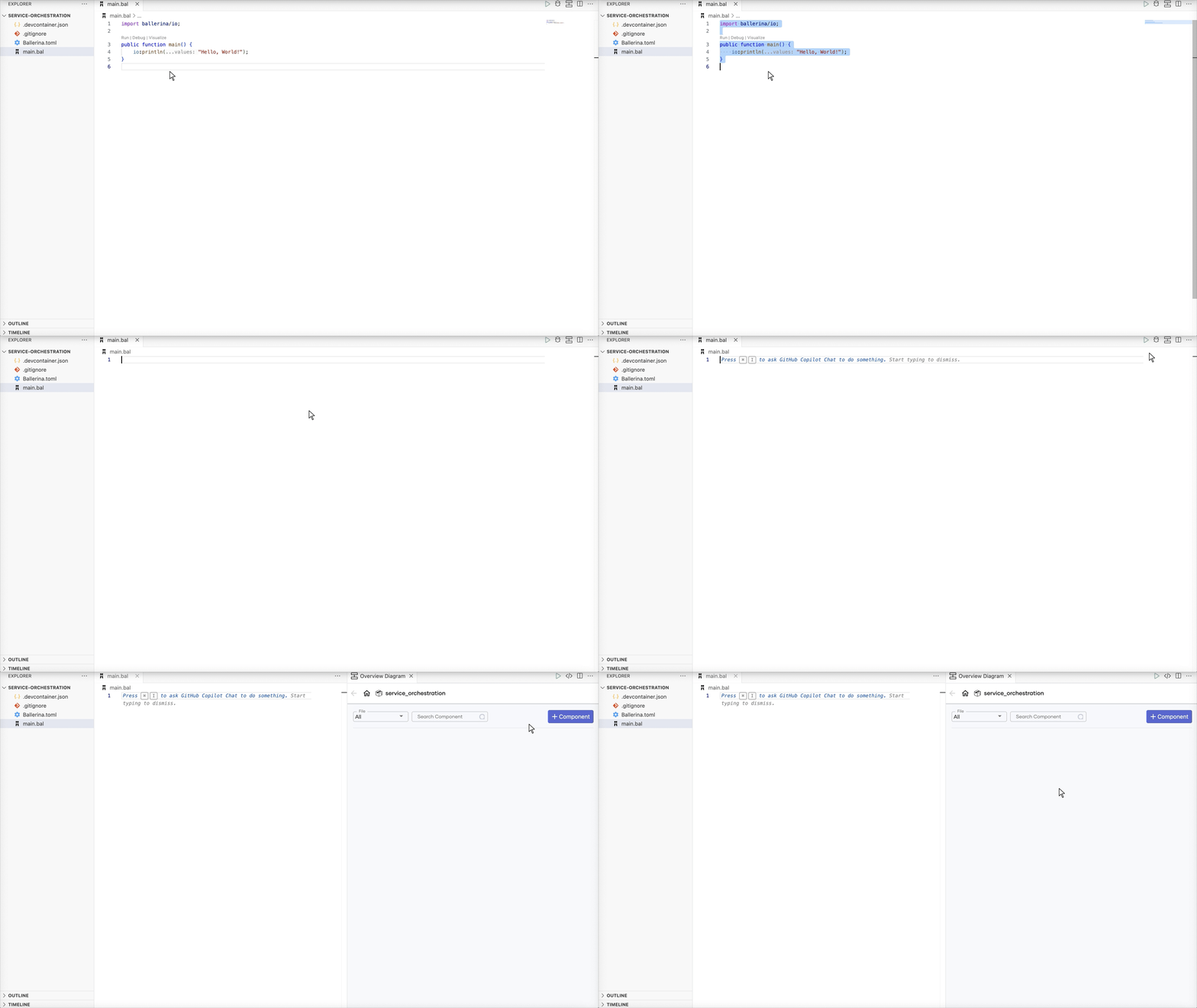
-
Generate record types corresponding to the payloads from the hospital and payment backend services by providing samples of the expected JSON payloads.
The payload from the hospital backend service will be a JSON object similar to the following.
{ "appointmentNumber": 1, "doctor": { "name": "thomas collins", "hospital": "grand oak community hospital", "category": "surgery", "availability": "9.00 a.m - 11.00 a.m", "fee": 7000.0 }, "patient": { "name": "John Doe", "dob": "1940-03-19", "ssn": "234-23-525", "address": "California", "phone": "8770586755", "email": "johndoe@gmail.com" }, "hospital": "grand oak community hospital", "confirmed": false, "appointmentDate": "2023-10-02" }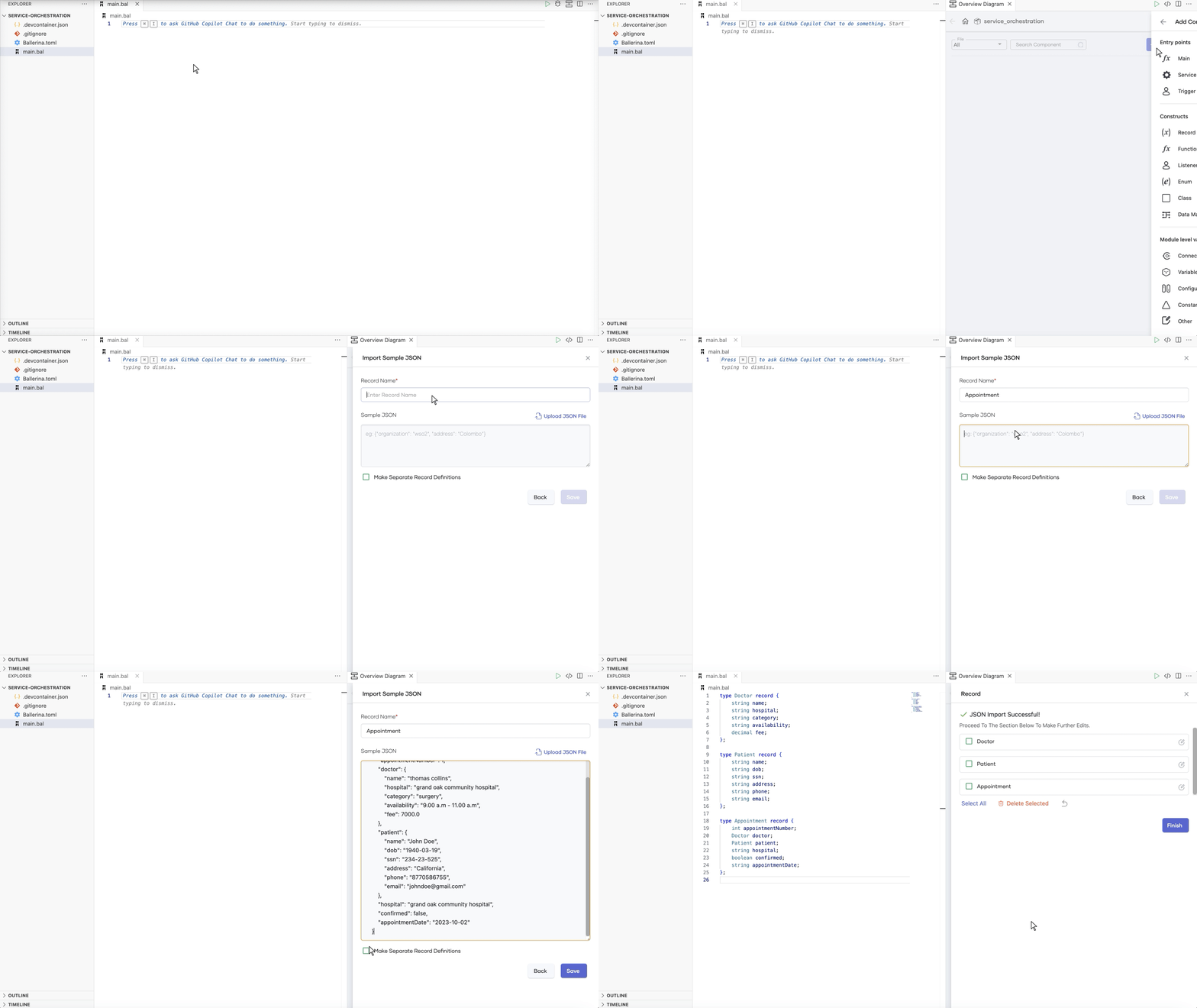
The generated records will be as follows
type Doctor record { string name; string hospital; string category; string availability; decimal fee; }; type Patient record { string name; string dob; string ssn; string address; string phone; string email; }; type Appointment record { int appointmentNumber; Doctor doctor; Patient patient; boolean confirmed; string hospital; string appointmentDate; };Similarly, generate records corresponding to the request payload (e.g.,
ReservationRequest). Update the duplicatePatientrecord toPatientWithCardNoand use record type inclusion to include all the fields from thePatientrecord along with thecardNofield.type PatientWithCardNo record { *Patient; string cardNo; }; type ReservationRequest record { PatientWithCardNo patient; string doctor; string hospital_id; string hospital; string appointment_date; }; type Fee record { string patientName; string doctorName; string actualFee; }; type ReservationStatus record { int appointmentNo; string doctorName; string patient; decimal actualFee; int discount; decimal discounted; string paymentID; string status; };Note: While it is possible to work with the JSON payload directly, using record types offers several advantages including enhanced type safety, data validation, and better tooling experience (e.g., completion).
Note: When the fields of the JSON objects are expected to be exactly those specified in the sample payload, the generated records can be updated to be closed records, which would indicate that no other fields are allowed or expected.
-
Define the HTTP service (REST API) that has the resource that accepts user requests, makes calls to the backend services to make an appointment, and responds to the client.
-
Open the Ballerina HTTP API Designer in VS Code.
-
Use
/healthcareas the service path (or the context) for the service attached to the listener that is listening on port8290.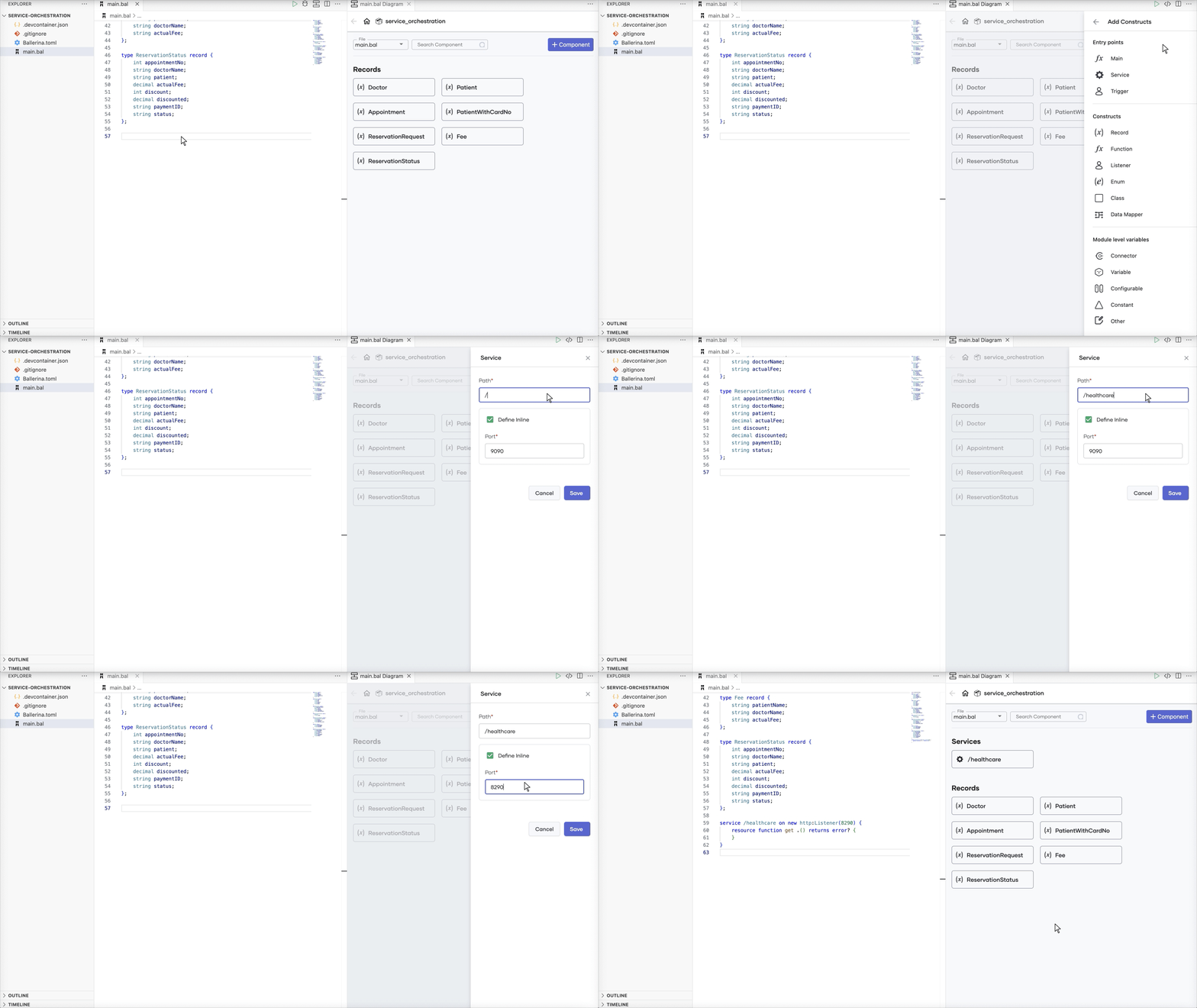
-
Define an HTTP resource that allows the
POSToperation on the resource path/categories/{category}/reserveand accepts thecategorypath parameter (corresponding to the specialization). UseReservationRequestas a parameter indicating that the resource expects a JSON object corresponding toReservationRequestas the payload. UseReservationStatus,http:NotFound, andhttp:InternalServerErroras the response types.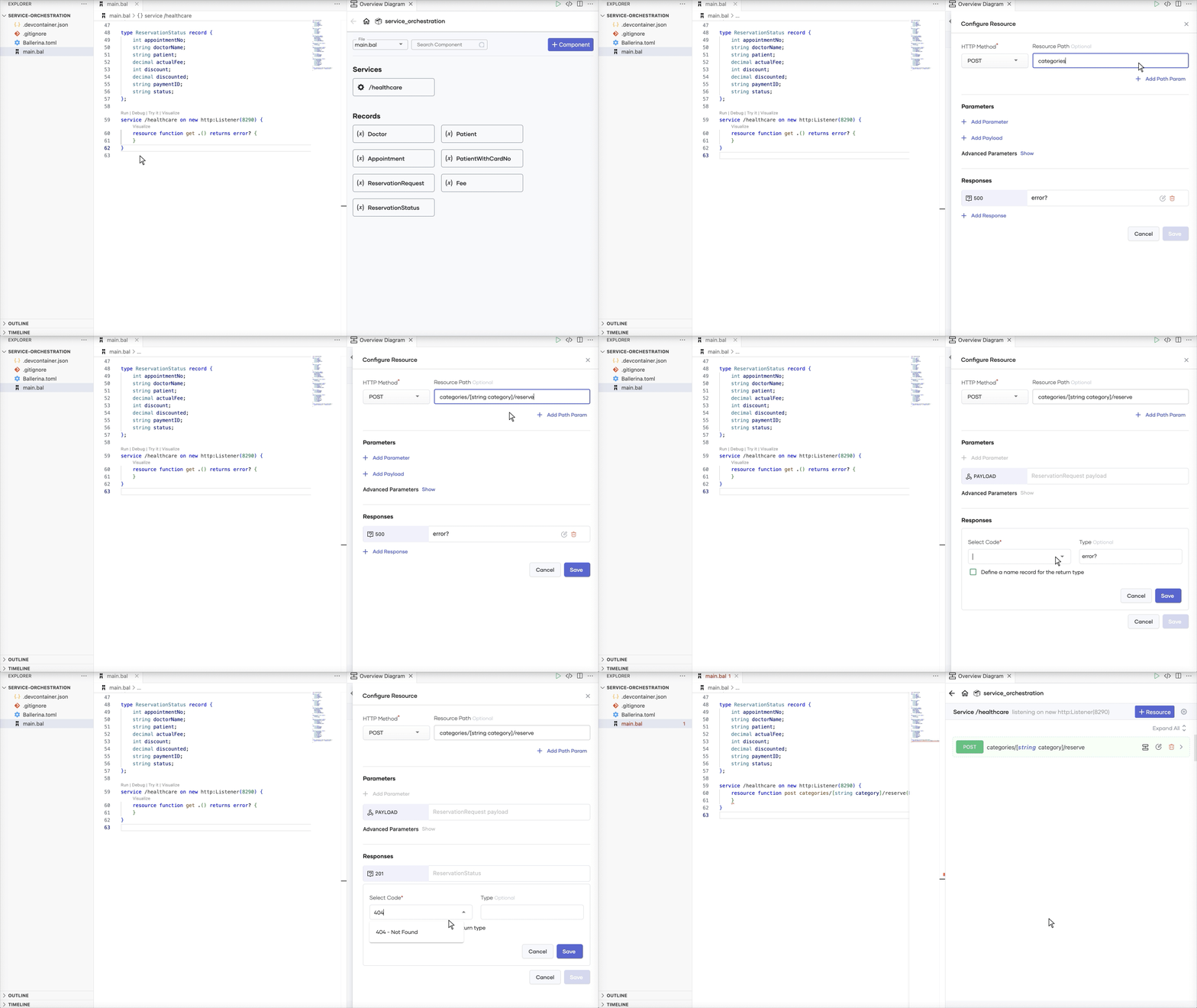
The generated service will be as follows.
service /healthcare on new http:Listener(8290) { resource function post categories/[string category]/reserve(ReservationRequest payload) returns ReservationStatus|http:NotFound|http:InternalServerError { } }
-
-
Define configurable variables for the URLs of the backend services and two
http:Clientobjects to send requests to the backend services.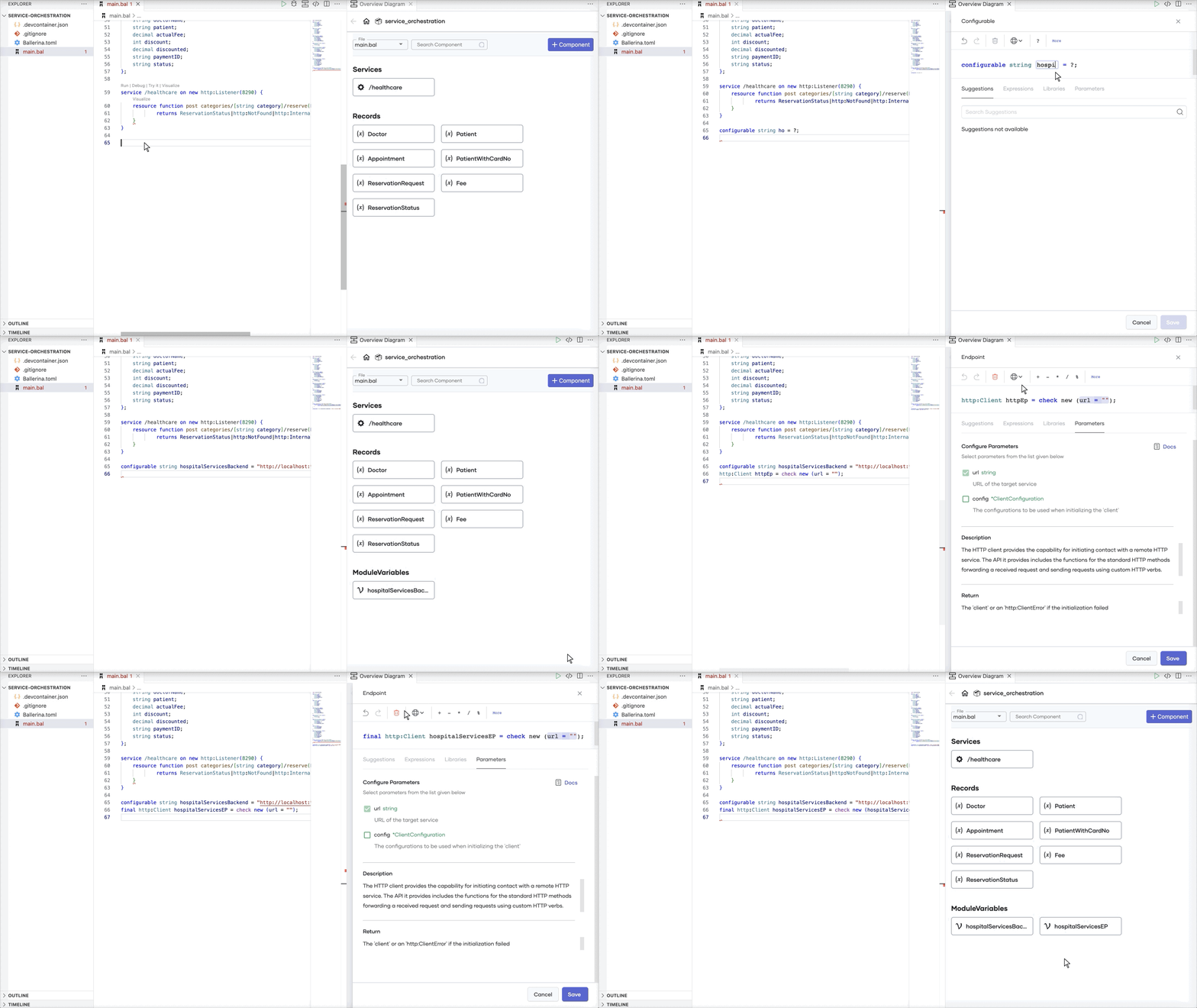
The generated code will be as follows.
configurable string hospitalServicesBackend = "http://localhost:9090"; configurable string paymentBackend = "http://localhost:9090/healthcare/payments"; final http:Client hospitalServicesEP = check new (hospitalServicesBackend); final http:Client paymentEP = check new (paymentBackend); -
Implement the logic.
service /healthcare on new http:Listener(8290) { resource function post categories/[string category]/reserve(ReservationRequest payload) returns ReservationStatus|http:NotFound|http:InternalServerError { PatientWithCardNo patient = payload.patient; Appointment|http:ClientError appointment = hospitalServicesEP->/[payload.hospital_id]/categories/[category]/reserve.post({ patient: { name: patient.name, dob: patient.dob, ssn: patient.ssn, address: patient.address, phone: patient.phone, email: patient.email }, doctor: payload.doctor, hospital: payload.hospital, appointment_date: payload.appointment_date }); if appointment !is Appointment { log:printError("Appointment reservation failed", appointment); if appointment is http:ClientRequestError { return <http:NotFound> {body: string `unknown hospital, doctor, or category`}; } return <http:InternalServerError> {body: appointment.message()}; } int appointmentNumber = appointment.appointmentNumber; Fee|http:ClientError fee = hospitalServicesEP->/[payload.hospital_id]/categories/appointments/[appointmentNumber]/fee; if fee !is Fee { log:printError("Retrieving fee failed", fee); if fee is http:ClientRequestError { return <http:NotFound> {body: string `unknown appointment ID`}; } return <http:InternalServerError> {body: fee.message()}; } decimal|error actualFee = decimal:fromString(fee.actualFee); if actualFee is error { return <http:InternalServerError> {body: "fee retrieval failed"}; } ReservationStatus|http:ClientError status = paymentEP->/.post({ appointmentNumber, doctor: appointment.doctor, patient: appointment.patient, fee: actualFee, confirmed: false, card_number: patient.cardNo }); if status !is ReservationStatus { log:printError("Payment failed", status); if status is http:ClientRequestError { return <http:NotFound> {body: string `unknown appointment ID`}; } return <http:InternalServerError> {body: status.message()}; } return status; } }-
The first backend call is a
POSTrequest to the hospital service to reserve the appointment. Thehospital_idandcategoryvalues are used as path parameters. -
Use the
ischeck to decide the flow based on the response to the client call. If the request failed with a4xxstatus code, respond with anhttp:NotFoundresponse. Else, if the payload could not be bound toAppointmentas expected or there was some other failure, respond with anhttp:InternalServerErrorresponse. If the client call was successful and the response payload was successfully bound toAppointment, we can proceed with the subsequent calls. -
If the appointment reservation was successful, we can now retrieve the fee, by making a
GETrequest to the hospital service, withhospital_idandappointmentNumberfrom theAppointmentpayload as path parameters. -
If fee retrieval is successful, the next and last step is to make the payment by making a
POSTrequest to the payment service. The payload includes details extracted out from the original request (forpatientandcard_number), the appointment reservation response (forappointmentNumberanddoctor), and the response to the fee retrieval request (forfee). -
If the payment request fails, the response to the original request will be an appropriate error response. If not, the response will be the response from the payment service.
-
You have successfully developed the required service.
Complete source
import ballerina/http; import ballerina/log; type Doctor record {| string name; string hospital; string category; string availability; decimal fee; |}; type Patient record {| string name; string dob; string ssn; string address; string phone; string email; |}; type Appointment record {| int appointmentNumber; Doctor doctor; Patient patient; boolean confirmed; string hospital; string appointmentDate; |}; type PatientWithCardNo record {| *Patient; string cardNo; |}; type ReservationRequest record {| PatientWithCardNo patient; string doctor; string hospital_id; string hospital; string appointment_date; |}; type Fee record {| string patientName; string doctorName; string actualFee; |}; type ReservationStatus record {| int appointmentNo; string doctorName; string patient; decimal actualFee; int discount; decimal discounted; string paymentID; string status; |}; configurable string hospitalServicesBackend = "http://localhost:9090"; configurable string paymentBackend = "http://localhost:9090/healthcare/payments"; final http:Client hospitalServicesEP = check new (hospitalServicesBackend); final http:Client paymentEP = check new (paymentBackend); service /healthcare on new http:Listener(8290) { resource function post categories/[string category]/reserve(ReservationRequest payload) returns ReservationStatus|http:NotFound|http:InternalServerError { PatientWithCardNo patient = payload.patient; Appointment|http:ClientError appointment = hospitalServicesEP->/[payload.hospital_id]/categories/[category]/reserve.post({ patient: { name: patient.name, dob: patient.dob, ssn: patient.ssn, address: patient.address, phone: patient.phone, email: patient.email }, doctor: payload.doctor, hospital: payload.hospital, appointment_date: payload.appointment_date }); if appointment !is Appointment { log:printError("Appointment reservation failed", appointment); if appointment is http:ClientRequestError { return <http:NotFound> {body: string `unknown hospital, doctor, or category`}; } return <http:InternalServerError> {body: appointment.message()}; } int appointmentNumber = appointment.appointmentNumber; Fee|http:ClientError fee = hospitalServicesEP->/[payload.hospital_id]/categories/appointments/[appointmentNumber]/fee; if fee !is Fee { log:printError("Retrieving fee failed", fee); if fee is http:ClientRequestError { return <http:NotFound> {body: string `unknown appointment ID`}; } return <http:InternalServerError> {body: fee.message()}; } decimal|error actualFee = decimal:fromString(fee.actualFee); if actualFee is error { return <http:InternalServerError> {body: "fee retrieval failed"}; } ReservationStatus|http:ClientError status = paymentEP->/.post({ appointmentNumber, doctor: appointment.doctor, patient: appointment.patient, fee: actualFee, confirmed: false, card_number: patient.cardNo }); if status !is ReservationStatus { log:printError("Payment failed", status); if status is http:ClientRequestError { return <http:NotFound> {body: string `unknown appointment ID`}; } return <http:InternalServerError> {body: status.message()}; } return status; } }
Step 3: Build and run the service
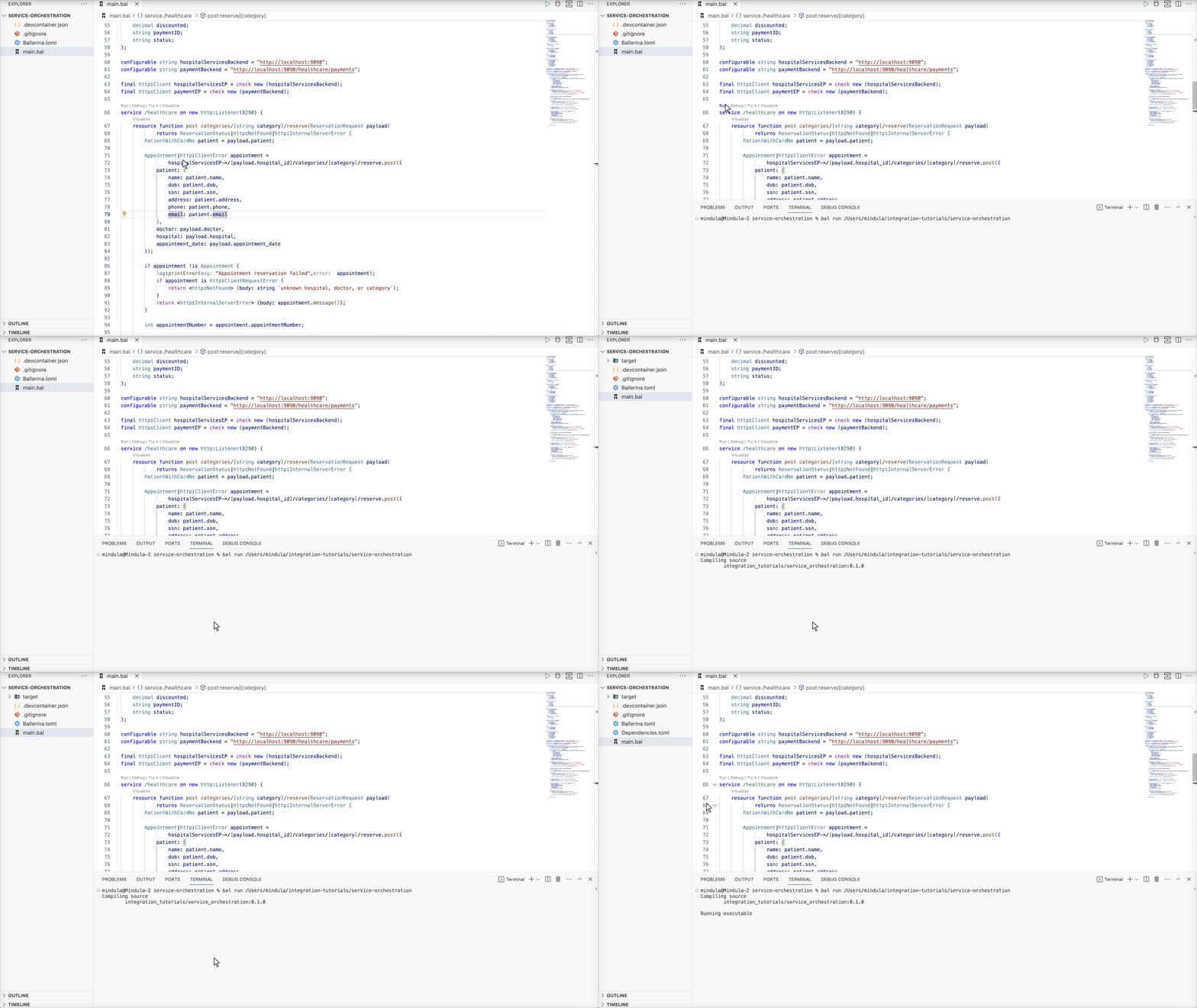
Note: Alternatively, you can run this service by navigating to the project root and using the
bal runcommand.service-orchestration$ bal run Compiling source integration_tutorials/service_orchestration:0.1.0 Running executable
Step 4: Try out the use case
Let's test the use case by sending a request to the service.
Start the backend service
Download the JAR file for the backend service and execute the following command to start the service.
$ bal run hospitalservice.jar
Send a request
Use the Try it feature to send a request to the service. Specify surgery as the path parameter. Use the following as the request payload.
{ "patient": { "name": "John Doe", "dob": "1940-03-19", "ssn": "234-23-525", "address": "California", "phone": "8770586755", "email": "johndoe@gmail.com", "cardNo": "7844481124110331" }, "doctor": "thomas collins", "hospital_id": "grandoaks", "hospital": "grand oak community hospital", "appointment_date": "2023-10-02" }
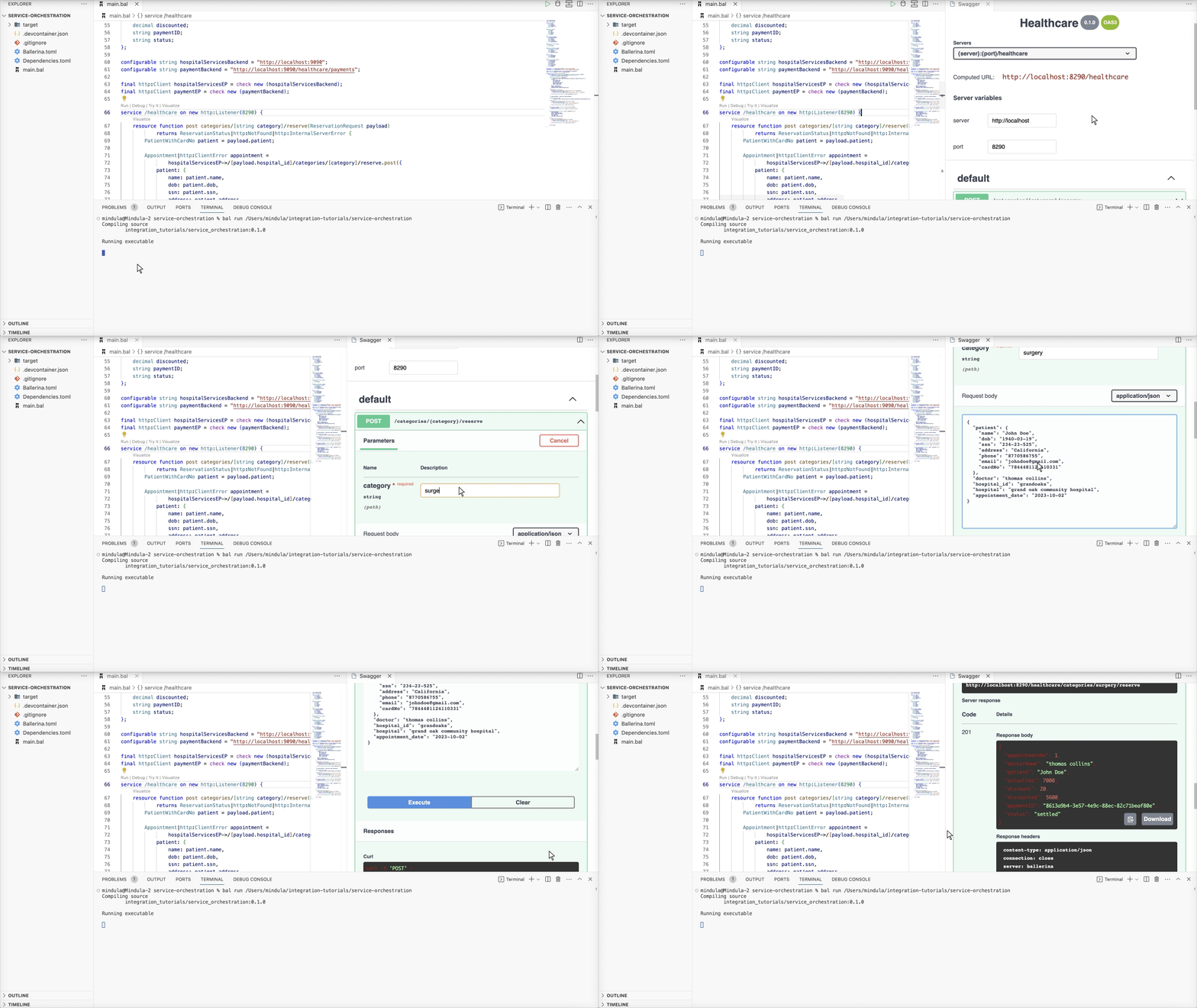
Verify the response
You will see a response similar to the following for a successful appointment reservation.
{ "appointmentNo": 1, "doctorName": "thomas collins", "patient": "John Doe", "actualFee": 7000.0, "discount": 20, "discounted": 5600.0, "paymentID": "f55314dc-0d82-4cff-8eae-7ce941f98451", "status": "settled" }
Complete implementation
Check out the complete implementation on GitHub.